最近在给别人维护的一份 Angular 的代码需要升级版本,升级完成后,lint 给了大量的 toPromise warning,看的我十分难受。但要一个一个手动改也十分头疼,查看 RxJS 官方的说明,也没有提供工具迁移,于是只能自己开发一个。
本文记录了开发过程,文末附带这个工具的 github 链接。
准备工作
代码迁移实际上就是文本替换,但不能直接使用字符串查找替换的方法解决,因为代码是有上下文的,我们需要依赖这个上下文才能找到具体要替换的位置,已经替换后的样子,所以哪怕是依靠正则替换也是不行的。
这里可以通过编译原理的知识可以得知,代码是解析成 AST(语法树)。我们可以遍历 AST 找到特定特征的代码。
最开始是想直接使用 typescript 这个包来完整这个解析,但当我做完之后,发现回写到源代码时,丢失了一些空行,这是无法接收的。
于是通过询问 chatgpt 得知可以使用 ts-morph 解析。看了一下文档,这个库也是基于 typescript 的,但通过它回写却没有出现丢失空行的问题,应该是之前直接使用 typescript 姿势不对,但这已经不重要了,ts-morph 确实比直接用 typescript 方便很多,而且至少官方有示例,typescript 是一个例子都没有。
这个项目本身使用 ts 开发,为了方便使用,这里安装 ts-node 直接运行 ts 代码,避免先编译再运行。
代码
1
2
3
4
5
6
7
8
9
10
11
12
13
14
15
16
17
18
19
20
21
22
23
24
25
26
27
28
29
30
31
32
33
34
35
36
37
38
39
40
41
42
43
44
45
46
| import * as fs from 'node:fs'
import process from 'node:process'
import { Project, ts } from 'ts-morph'
const dir = process.argv?.[2]
if (!dir) {
console.error('Please specify a directory')
process.exit(1)
}
const project = new Project()
project.addSourceFilesAtPaths(dir)
for (const sourceFile of project.getSourceFiles()) {
let hasChange = false
sourceFile.transform((traversal) => {
const node = traversal.visitChildren()
if (ts.isCallExpression(node) && ts.isPropertyAccessExpression(node.expression) && node.expression.name.getText() === 'toPromise') {
hasChange = true
return ts.factory.createCallExpression(
ts.factory.createIdentifier('lastValueFrom'),
[],
[node.expression.expression],
)
}
return node
})
if (!hasChange)
continue
const importDeclaration = sourceFile.getImportDeclaration('rxjs')
if (!importDeclaration) {
sourceFile.addImportDeclaration({
moduleSpecifier: 'rxjs',
namedImports: ['lastValueFrom'],
})
}
else {
const index = importDeclaration.getNamedImports().findIndex(namedImport => namedImport.getName() === 'lastValueFrom')
if (index === -1)
importDeclaration.addNamedImport('lastValueFrom')
}
fs.writeFileSync(sourceFile.getFilePath(), sourceFile.getFullText())
}
|
实际上一共也没几行,主要解释一下定位特征和替换。
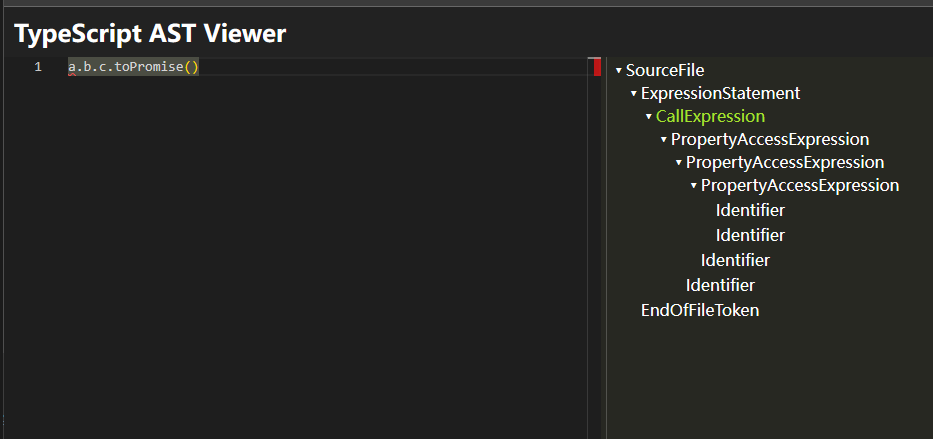
首先要知道,对于a.b.c.toPromise()这样的代码,会生成如下的 AST
而对于lastValueFrom(a.b.c)这样的代码,则需要这样创建 AST
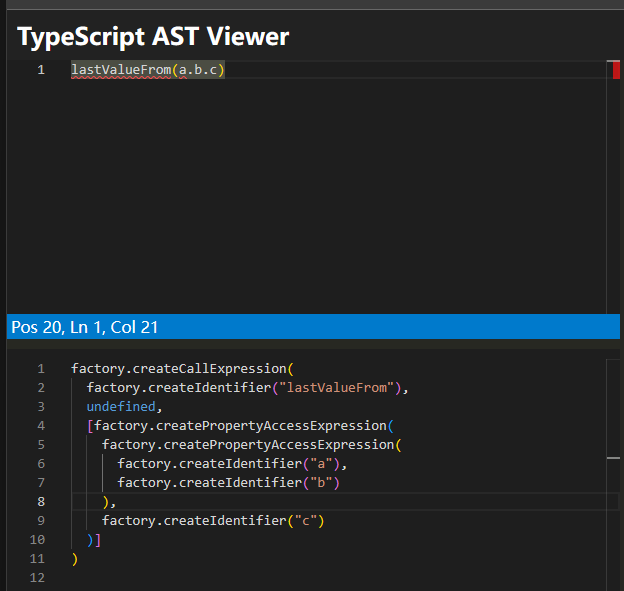
你可以直接在 https://ts-ast-viewer.com/ 上可视化的看到 AST,非常方便。
另外需要处理的是,如果原来的文件中没有 import rxjs 这个包,或者 import 了但是没有导入 lastValueFrom 这个函数,还需要添加一下 import。
仓库地址
https://github.com/weilence/migrate-to-promise